
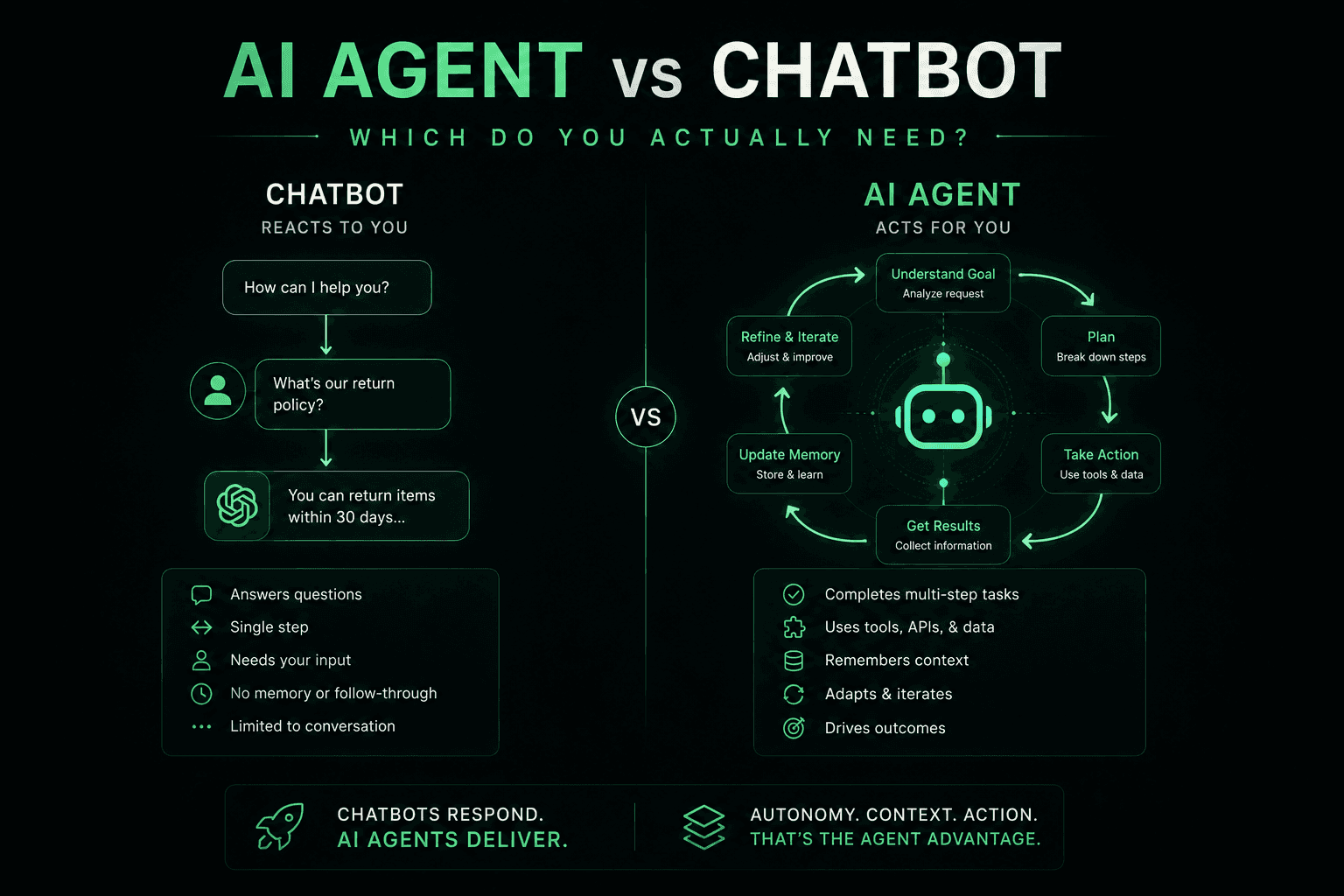
AI chatbots and AI agents are not the same thing. Choosing the wrong one costs you either months of over-engineering or a system that can't actually do the job. This guide explains the real architectural difference, walks through side-by-side comparisons, shows what each looks like in four industries, and gives you a concrete decision framework built from deploying both in production.
Chatbot vs. AI agent in one sentence
- Chatbot: A conversational interface that reads an input and generates a response. It answers.
- AI agent: A goal-driven system that reasons, plans, calls tools and APIs, observes results, and iterates until the task is done. It acts.
What is a chatbot?
A chatbot is fundamentally a request–response system. It takes user input, processes it, and returns text. Chatbots have gone through three generations:
Rule-based chatbots (2010s): If-then flowchart logic. "If the user says X, respond with Y." Still used for tightly controlled FAQ flows where every expected question is defined in advance.
NLP chatbots (2018–2022): Intent classification engines (Dialogflow, LUIS, Rasa) that match free-form input to predefined intents. Better at phrasing variation, but limited to the intent library you defined up front.
LLM chatbots (2023–present): GPT-4o, Claude Sonnet, Gemini power the response. Handles open-ended conversation naturally and can use a RAG knowledge base to answer from your documents. But architecturally it is still a response system: given input, produce output.
What all three generations share: They respond. They do not plan. They do not call external systems on their own. A chatbot cannot decide "I need to check the database, then send an email, then update the CRM" autonomously.
Example: A customer asks a support chatbot: "When will my order arrive?" The chatbot responds with a help article about delivery times. It cannot look up order #12345 in your OMS, check the carrier API, and return a live ETA — unless you manually wire each integration and specify every possible path.
What is an AI agent?
An AI agent uses an LLM as a reasoning engine, gives it access to tools (functions it can call), and runs it in a loop until the task is complete. The agent decides which tools to use, in what order, based on what the goal requires — not a script you wrote in advance.
The agent loop:
- Receive goal: "Book the earliest available appointment with Dr. Smith for patient 123."
- Plan: Check calendar availability, verify patient eligibility, then book and confirm.
- Call tool:
search_calendar(doctor="Dr. Smith", from=today)→ returns 3 open slots. - Call tool:
check_patient_eligibility(patient_id=123)→ insurance confirmed. - Call tool:
create_appointment(slot="Thu 2 PM", patient=123)→ booked. - Call tool:
send_confirmation_sms(patient=123)→ confirmation sent. - Report: "Done — you are booked for Thursday at 2 PM with Dr. Smith. Confirmation sent to your phone."
A chatbot answering the same request would have responded: "To book an appointment, please call our office at..." The agent did the task.
Side-by-side comparison
| Dimension | Chatbot | AI Agent |
|---|---|---|
| Core capability | Respond to queries | Plan and execute multi-step tasks |
| Real-world actions | Text output only | API calls, DB writes, emails, file ops |
| Multi-step reasoning | No | Yes — plans and re-plans based on results |
| Tool / API use | No | Yes |
| Memory | Session only | Can persist state across sessions |
| Autonomy | None — human decides next step | Decides next steps independently |
| Error handling | Fixed fallback responses | Can retry, use alternatives, escalate |
| Build complexity | Low–medium | Medium–high |
| Latency per turn | ~500ms | 1–10s depending on tool chain |
| Best for | FAQ, support deflection, information lookup | Task completion, workflow automation |
Real-world examples by industry
The same use case looks completely different depending on whether you deploy a chatbot or an agent. Four industries we build for regularly.
Healthcare
Chatbot: Answers "What are your office hours?" or "Do you accept Blue Cross?" — pulls from a knowledge base, returns a text answer. Fast to deploy, zero integration risk.
AI agent: Patient calls after hours. The agent checks their eligibility in the EHR, finds the next available slot with their assigned physician, books the appointment, and sends an SMS confirmation — all in one call, no human involved. Requires EHR API integration and HIPAA-compliant architecture, but replaces an after-hours answering service entirely.
E-commerce and retail
Chatbot: "What is your return policy?" — returns a paragraph from your FAQ docs. Deflects 30–50% of support tickets instantly.
AI agent: "I want to return order #45821." The agent looks up the order in your OMS, confirms eligibility against your return policy, generates a return label, emails it to the customer, and creates a refund ticket in Zendesk — fully autonomous, zero human involvement.
Financial services
Chatbot: Explains loan products, answers rate questions, and describes the application process from a knowledge base.
AI agent: Takes a mortgage pre-qualification call, collects income and property info via voice, pulls a soft credit check via API, calculates preliminary DTI, and routes the file to the right loan officer — with the completed intake form already in the CRM before any human touches it.
Real estate
Chatbot: Answers questions about a listing — square footage, school district, HOA fees — from the property data sheet.
AI agent: A lead calls within 10 seconds of a web inquiry. The agent qualifies budget and timeline, checks available properties via MLS API, schedules a showing in the agent's calendar, and logs the full interaction in Follow Up Boss — before any human is involved. Speed-to-lead is the single biggest driver of conversion in real estate, and agents solve it completely.
When to use a chatbot
Choose a chatbot when:
- The use case is information delivery — FAQ, product specs, policy lookup, status updates
- Every interaction fits within a narrow, well-defined domain with predictable questions
- You need fast deployment with minimal integration risk — days, not weeks
- Budget is constrained — chatbots cost significantly less to build and run per conversation
- The failure mode of a wrong answer is low-stakes and the user can easily verify or escalate
Good chatbot use cases: Website FAQ, internal HR policy lookup, first-line customer support deflection, product documentation assistant, lead pre-screening that only asks qualifying questions.
When to use an AI agent
Choose an AI agent when:
- The user needs something done, not just answered — booking, cancellation, refund, data lookup with action
- The task requires multiple steps and different users need different action sequences
- Integration with external systems is required — CRM, EHR, OMS, calendar, payment processor
- You want to automate a full workflow, not just a Q&A step within a workflow
- 24/7 coverage matters and your current bottleneck is human availability, not information
Good AI agent use cases: Inbound voice agent for appointment scheduling, outbound SDR that qualifies leads and books demos, customer service agent that resolves issues end-to-end, operations agent that processes orders and handles exceptions autonomously.
Hybrid architectures: using both in the same system
Most production systems we deploy combine both: a chatbot layer handles 70–80% of interactions, and agents handle the complex 20–30% that require real-world action. Routing between them is handled by an intent classifier or the LLM itself.
Example — e-commerce customer service platform:
- "What is your return window?" → LLM chatbot with RAG knowledge base (no agent needed, answer in 500ms)
- "Cancel my order" → agent calls the OMS cancellation API and confirms
- "Dispute a charge" → agent creates a dispute ticket, notifies the finance team, emails the customer
- Complex edge cases → escalated to human agent with full context pre-populated, zero re-explanation
The key is not choosing one over the other — it is designing the right boundary between them and making sure that boundary is enforced by routing logic, not guesswork.
Cost and build complexity: what to expect
Cost is one of the most common reasons teams reach for a chatbot when they need an agent, or over-invest in an agent for a problem a chatbot solves in a week. Realistic numbers:
| Item | Chatbot | AI Agent |
|---|---|---|
| PoC build cost | $3K–$10K | $5K–$15K |
| Production build | $10K–$40K | $25K–$100K+ |
| Per-conversation cost | $0.002–$0.01 | $0.05–$0.50 (tool calls add cost) |
| Time to first deploy | 1–3 weeks | 3–8 weeks |
| Integration effort | Low | Medium–High |
| Primary ROI driver | Support ticket deflection | Labor replacement, process automation |
The ROI calculus differs significantly. A chatbot typically reduces support ticket volume by 30–50% — measurable but incremental. A voice AI agent handling 1,000 inbound calls/day replaces the equivalent of 5–8 full-time agents, generating $200K–$400K in annual savings against a one-time build cost of $30K–$75K. The agent has a harder build and higher per-conversation cost, but the return is an order of magnitude larger.
The decision framework: one question to start
Ask: Does the user need me to do something, or just tell them something?
- Tell → chatbot is sufficient. Build it with a good RAG knowledge base and deploy in days.
- Do → you need an agent with tool access and a reasoning loop.
- Both → design a hybrid: chatbot for the 70%, agent for the 30% that requires action.
If you are still unsure, look at your last 10 customer service interactions that required a human. Count how many ended with the human doing something versus just saying something. If more than 30% required action, you are leaving significant automation potential on the table with a chatbot alone.
Frequently asked questions
Is ChatGPT an AI agent or a chatbot?
ChatGPT in its standard interface is a chatbot — a highly capable LLM-powered one, but architecturally a response system. However, ChatGPT with plugins enabled, or GPT-4o with tool use, becomes an AI agent: it can call functions, browse the web, execute code, and take multi-step actions. The model is the same; the architecture around it determines whether it is a chatbot or an agent.
What are the 5 types of AI agents?
The five commonly referenced agent architectures are: (1) Simple reflex agents — react to current input with predefined rules; (2) Model-based reflex agents — maintain internal state about the world; (3) Goal-based agents — plan sequences of actions toward an explicit goal; (4) Utility-based agents — choose actions that maximise a utility function; (5) Learning agents — improve performance over time from feedback. Modern LLM agents are typically goal-based or utility-based, using the LLM as the reasoning engine.
Can a chatbot become an AI agent?
Yes. An LLM chatbot becomes an agent when you (1) give it access to tools (functions it can call), (2) wrap it in a loop that processes tool results and decides the next step, and (3) give it a goal rather than just a prompt. Frameworks like LangGraph, AutoGen, and Vapi's tool call system all provide this scaffolding. The incremental migration from chatbot to agent is one of the most common architectures we implement for clients who started with a simple FAQ bot.
What is the difference between an AI agent and a virtual assistant?
Virtual assistant is a broad consumer term (Siri, Alexa, Google Assistant). AI agent is an architectural term describing a system with a tool-use loop and goal-driven reasoning. The two overlap significantly: modern virtual assistants built on LLMs with action capabilities are technically AI agents. The distinction matters most in enterprise contexts, where purpose-built agents handle specific workflows — appointment booking, order management, lead qualification — rather than general-purpose consumer queries.
Is a voice AI agent the same as a chatbot?
No. A voice AI agent (built on Vapi, Retell, or LiveKit) is an AI agent with a voice interface — it can book appointments, update CRM records, and process transactions over a phone call. An IVR system or a voice-enabled FAQ bot is a chatbot with a voice interface. The voice modality does not determine agent vs. chatbot status; the architecture (tool-use loop, goal reasoning) does.
How much does an AI agent cost compared to a chatbot?
A chatbot PoC runs $3K–$10K with production builds at $10K–$40K. An AI agent PoC runs $5K–$15K with production builds at $25K–$100K+, depending on integration complexity. Per-conversation costs are higher for agents due to tool API calls — roughly $0.05–$0.50 per conversation vs. $0.002–$0.01 for a chatbot. However, agent ROI is typically far larger: a voice agent handling inbound calls can replace $200K–$400K in annual staffing costs against a one-time build of $30K–$75K.
When should a small business use a chatbot vs. an AI agent?
Start with a chatbot if your main need is answering common questions 24/7 without a human on call. A basic RAG chatbot on your website costs $3K–$8K and deflects 30–50% of inbound inquiries. Graduate to an agent when you find your chatbot constantly directing customers to "call back" or "email us" because it cannot take action. That handoff moment — where information is not enough and action is required — is your signal to add an agent layer.
The bottom line
Chatbots and AI agents are not competing technologies — they serve different layers of the same problem. Chatbots excel at information retrieval at scale. Agents excel at task completion across systems. Most businesses need both, layered correctly, with clean routing between them.
The practical test: take your last 10 customer interactions that required a human. Count how many ended with the human doing something versus just saying something. If the answer is mostly doing, you are leaving significant automation potential on the table by deploying only a chatbot.
Hestur AI builds both — from RAG-powered chatbots to multi-step voice AI agents integrated with your EHR, CRM, and operations stack. We scope your build in 48 hours and deliver a working proof of concept in 2–4 weeks. Book a free discovery call to get a recommendation on which architecture fits your exact use case.