
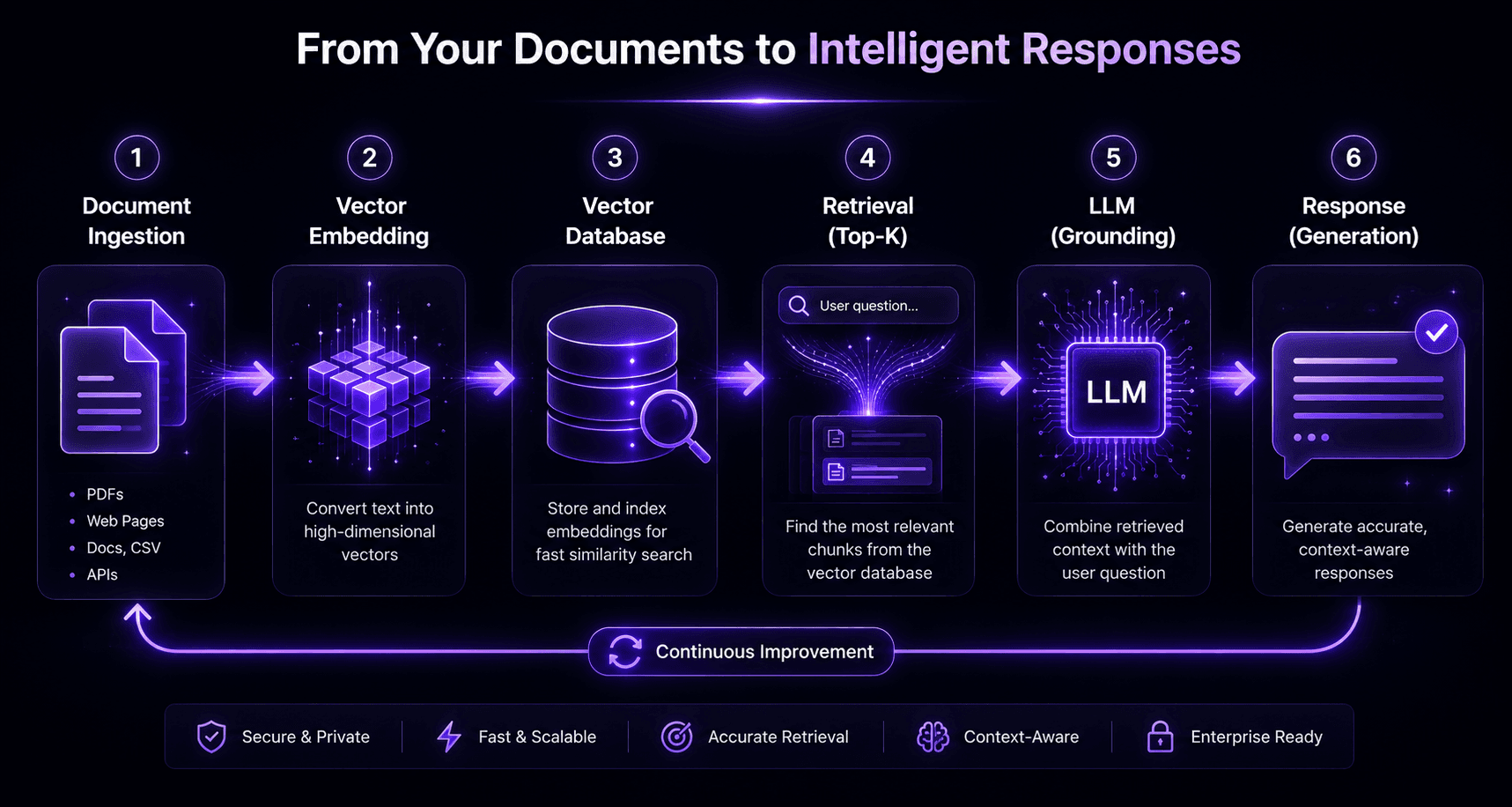
Building a RAG (retrieval-augmented generation) application requires five components: a document ingestion pipeline, a chunking strategy, an embedding model, a vector database, and a retrieval-augmented generation chain. A working prototype takes 1–2 days; a production system achieving 90%+ retrieval accuracy takes 4–8 weeks.
What RAG is and why it matters
RAG solves the fundamental problem of LLMs: they know a lot about the world up to their training cutoff, but nothing about your specific data — your docs, your products, your policies, your history. RAG fixes this by retrieving relevant context from your private knowledge base and injecting it into the LLM’s prompt at query time.
Without RAG: “I don’t have information about [your specific product].”
With RAG: “Based on your documentation, the refund policy is…”
The five components
1. Document ingestion pipeline
Ingestion is loading your source documents into a format suitable for chunking and embedding. Sources and their complexity:
| Source type | Parsing difficulty | Recommended tool |
|---|---|---|
| — | — | — |
| Plain text / Markdown | Trivial | Direct string processing |
| PDF (digital text) | Low | PyPDF2, pdfplumber |
| PDF (scanned) | High | AWS Textract, Google Document AI |
| Word documents | Low | python-docx |
| HTML / web pages | Medium | BeautifulSoup, Trafilatura |
| Google Drive / Notion | Medium | Official APIs |
| Database records | Medium | SQL query + templating |
| Excel / CSV | Low | Pandas |
2. Chunking strategy
Chunking is splitting documents into segments small enough for the embedding model but large enough to contain meaningful context. This is the most impactful variable in retrieval quality.
Fixed-size chunking: Split every N tokens with K token overlap. Simple but often misses semantic boundaries.
chunk_size = 512
overlap = 50
Sentence-boundary chunking: Split at sentence endings. Better semantic coherence for most text.
Semantic chunking: Split when content shifts topic, using an embedding model to detect topic changes. Best quality, highest compute cost.
Recursive character splitting (LangChain’s default): Tries paragraph → sentence → word splits in order. Good general-purpose default.
Rule of thumb: Start with recursive character splitting at 512–1024 tokens with 10–15% overlap. Tune based on retrieval accuracy benchmarks.
3. Embedding model
Embedding converts text to a numerical vector that captures semantic meaning. Choose based on your latency, accuracy, and cost requirements:
| Model | Dimensions | Cost | Best for |
|---|---|---|---|
| — | — | — | — |
| text-embedding-3-small | 1536 | $0.02/1M tokens | Most use cases |
| text-embedding-3-large | 3072 | $0.13/1M tokens | High-accuracy requirement |
| Cohere Embed v3 | 1024 | $0.10/1M tokens | Multilingual, code |
| BGE-M3 (local) | 1024 | Free | On-prem, data residency |
4. Vector database
The vector database stores embeddings and enables fast nearest-neighbour search at query time:
| Database | Hosting | Best for |
|---|---|---|
| — | — | — |
| Pinecone | Managed cloud | Fast PoC, small-medium index |
| Weaviate | Managed or self-hosted | Hybrid search, multi-modal |
| Qdrant | Self-hosted (primary) | Large index, on-prem, cost |
| pgvector | Existing Postgres | Small RAG on existing infra |
Recommendation: Start with Pinecone for PoC. Move to self-hosted Qdrant when your index exceeds 1M vectors — it’s 80–90% cheaper at scale.
5. RAG chain
The RAG chain ties it together:
- User submits a query
- Query is embedded using the same model as your documents
- Vector database returns the top-K most similar document chunks
- Chunks are injected into the LLM prompt as context
- LLM generates an answer grounded in the retrieved chunks
from langchain_openai import ChatOpenAI, OpenAIEmbeddings
from langchain_pinecone import PineconeVectorStore
from langchain.chains import RetrievalQA
embeddings = OpenAIEmbeddings(model=“text-embedding-3-small”)
vectorstore = PineconeVectorStore(index_name=“my-index”, embedding=embeddings)
llm = ChatOpenAI(model=“gpt-4o”, temperature=0)
qa_chain = RetrievalQA.from_chain_type(
llm=llm,
retriever=vectorstore.as_retriever(search_kwargs={"k": 5})
)
response = qa_chain.invoke({“query”: “What is the refund policy?”})
Adding retrieval quality layers
Basic vector similarity search gets you to ~75–80% retrieval accuracy. To reach 90%+:
Hybrid search (BM25 + vector): Combines keyword matching with semantic similarity. Catches cases where exact terminology matters (product names, codes, IDs).
Reranking: A second-pass model (Cohere Rerank or a cross-encoder) re-scores the top-K results for relevance. Adds 8–15 percentage points of precision.
Query decomposition: For complex multi-hop questions, decompose into sub-questions, retrieve for each, then synthesise. Required for questions like “Compare our refund policy to our warranty policy.”
Metadata filtering: Filter results by date, department, document type, or access level. Essential at 100k+ documents to prevent outdated or irrelevant results.
Common mistakes
Wrong chunk size. Too small = no context; too large = retrieval returns irrelevant surrounding text. Test at 256, 512, and 1024 tokens and benchmark.
No evaluation framework. Build a test set of 50–100 question-answer pairs from your domain before deploying. Measure retrieval accuracy (did the right document come back?) and answer accuracy (was the answer correct?).
Static embeddings for dynamic data. If your source documents update frequently, your embeddings go stale. Build an incremental update pipeline from day one.
Ignoring hallucination. LLMs sometimes generate confident wrong answers even with good retrieval. Add source citation (“based on [document name], …”) and implement confidence thresholds.
Build timeline
- Day 1–2: Working prototype with one document source and Pinecone